
Biped & quadruped
Mecha-ready
Rigify controls
Editable output


Guide-based biped and quadruped rig creation with selectable facing direction, plus separate skeleton and control-rig stages.

Biped

Quadruped
Facing direction
Bind separate rigid objects to their closest bones for robots, hard-surface characters, armour, and modular assemblies.
Assign separate rigid objects to their closest bones without repetitive manual setup.
Robots
Armour
Hard-surface models
Rigid parts
Modular assemblies
Build clean animation controls and IK over an existing humanoid armature while keeping the original deformation skeleton.
Existing humanoid armatures
Original deformation skeleton
IK controls
Animator-friendly controls
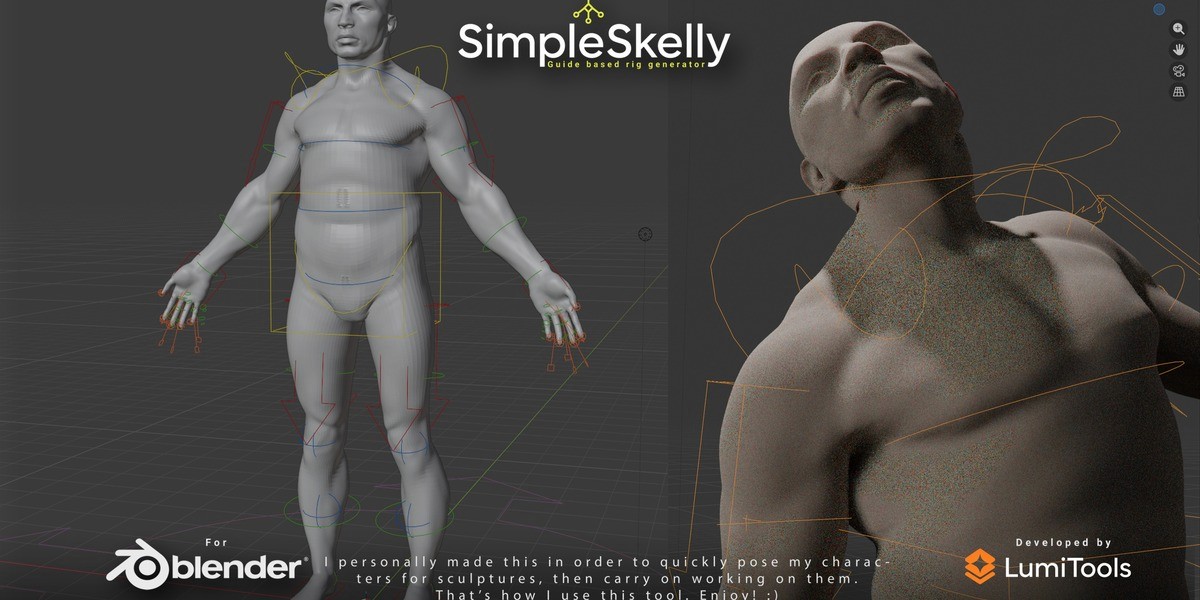
Keep the skeleton and control rig understandable.
SimpleSkelly separates setup stages so you can inspect and refine the results in familiar Blender tools.
Connect rigid parts without repetitive manual assignment.
Mecha Bind finds the closest bones for separate rigid objects, helping you rig robots, armour, and modular hard-surface assemblies.
Rigid objects
Closest bones
Robots
Armour
Modular assemblies
Animation controls built over your existing work.
Generate IK and clean animation controls over an existing humanoid armature while keeping the original deformation skeleton.
SimpleSkelly uses Blender’s built-in Rigify add-on to generate familiar, editable output you can inspect and adapt for production.
Blender-native setup
Rigify-based controls
Editable skeleton
Visible rig stages
Blender-native output
Guide-based biped/quadruped setup
Fast guide-driven rig creation.
Mecha binding
Bind rigid parts to closest bones.
Controls for existing skeletons
Keep your deformation skeleton.
Rigify-based IK and animation controls
Clean, animator-friendly controls.
Editable Blender-native output
Keep each stage visible and editable.
Requirements
Blender 4.0–5.2 with Blender’s built-in Rigify add-on.
Who It Is For
Character artists, hard-surface artists, concept artists, indie developers, and anyone working with mechanical characters.
Facing Direction
Choose how the character is oriented before guide placement.
Rig Stages
Build the skeleton first, then generate animation controls.
Does SimpleSkelly work for quadrupeds?
Yes. SimpleSkelly supports guide-based biped and quadruped setup with a selectable facing direction.
Can I rig mechanical characters?
Yes. Mecha Bind connects separate rigid objects to their closest bones for robots, armour, and modular assemblies.
Can I use an existing armature?
Yes. Custom Rig builds clean controls and IK over an existing humanoid armature while preserving the original deformation skeleton.
What Blender versions are supported?
SimpleSkelly supports Blender 4.0 through 5.2 and uses Blender’s built-in Rigify add-on.
Is the generated rig editable?
Yes. The output is Blender-native, so the important skeleton and control-rig stages remain visible and editable.
Who is SimpleSkelly for?
It is built for character artists, hard-surface artists, concept artists, indie developers, and anyone rigging mechanical characters.
Where do I buy it?
SimpleSkelly 1.0 is available on Superhive through LumiTools.
Does it require a separate application?
No. SimpleSkelly runs inside Blender and uses Blender’s built-in Rigify add-on.
SimpleSkelly keeps the rigging workflow practical, visible, and ready to refine in Blender.
Get SimpleSkelly — $9.99